Showing posts with label Workflow-Foundation-4. Show all posts

Wednesday, June 1, 2011

Workflow quirk: cannot access this inline location reference

Activity '{0}' cannot access this inline location reference because it is only valid for activity '{1}'. Only the activity which obtained the inline location reference is allowed to use it.

Inside my assign activity:
' foundfiles is IEnumerable(of String)
foundFiles.Where(Function(file As String) FileNameBlacklist.Any(Function(blacklistItem) System.IO.Path.GetFileName(file).StartsWith(blacklistItem)) = False)

Not sure if this or the subsequent access was failing, however changing it to this fixed it:

foundFiles.Where(Function(file As String) FileNameBlacklist.Any(Function(blacklistItem) System.IO.Path.GetFileName(file).StartsWith(blacklistItem)) = False).ToList().AsEnumerable

Thursday, May 12, 2011

Workflow 4 Default types to designer initialization

Dependency Injection way overboard?

I've been reflectoring, googling, stackoverflowing for weeks and just now stumbled upon the attribute injector code that runs to give ForEachActivity and SequenceActivity a designer.

Why weren't these attributes placed on the classes themselves? I have no idea.

Point your reflector at System.Activities.Core.Presentation in %windir%\Microsoft.NET\Framework\(4 something)


It's in 


System.Activities.Core.Presentation.DesignerMetadata.Register();
//Sneak peak
{
  AttributeTableBuilder builder = new AttributeTableBuilder();
  builder.AddCustomAttributes(typeof(ActivityAction),
    new Attribute[] { new EditorReuseAttribute(false) });
  SequenceDesigner.RegisterMetadata(builder);
  ForEachDesigner.RegisterMetadata(builder);
}

Tuesday, May 10, 2011

Tfs2010 string collection build argument snags

So it's great that you can use custom types, or more advanced types in Tfs 2010 workflow builds than you could in MSBuild tasks. However the editor/designer support is severely lacking. If you want an editor or designer that everyone can open up and even see what's set there, a custom assembly or vsix package has to be run on every machine that would need to be able to see or edit that argument. Even for something as basic as List<string>

After weeks of posting, forums, research etc... And trying this post it turns out that the legacy string array is what functions.

I wanted to

  • Provide defaults in the template, so that the consumer could just leave it if they didn't want anything more specific.
  • Allow for full customizations, adding, editing, removing.
  • Visibility of what's set for anyone looking at the build definition, not just people with a special assembly loaded.
But if you have tried the others they may have saved to the tfs database and cause your attempts to edit or view them to fail as if the type you are now trying isn't working. Here's a list of things I tried:
  • Microsoft.TeamFoundation.Build.Workflow.Activities.StringList
  • System.Collections.Specialized.StringDictionary
    • creating my own custom editor and adding it to the metadata
  • System.Collections.Generic.IList<string>
  • System.Collections.Generic.List<string>
As it turned out, I have no idea how many of these may have worked had the edit attempts I made not saved into the tfs database. 

Once I finally changed the variable name and tried String[] Array. All of the sudden, everything worked just fine. Alternatively, clicking refresh in team explorer -> Edit Build Definition -> Process tab -> Show details arrow -> click refresh is supposed to work. I wound up renaming the variable. 
So I went back to try all the types I listed and a few more... and the first 3 worked:

  • Microsoft.TeamFoundation.Build.Workflow.Activities.StringList
    • No custom editor specified
    • Microsoft.TeamFoundation.Build.Controls.WpfStringListEditor
  • String[] Array
Entirely or partially failed to function:
  • System.Collections.Specialized.StringDictionary
  • IList<string>
  • List<string>
  • IDictionary<string>
  • Dictionary<string>
  • Microsoft.TeamFoundation.Client.KeyValueOfStringString
  • KeyValuePair<string,string>[]

 What I want is a dictionary<string,string> but I'm getting pretty sure there's no support for it outside of a custom package deployed to all machines that want to view the arguments or edit them.

Copying a Tfs2010 Build template into same project

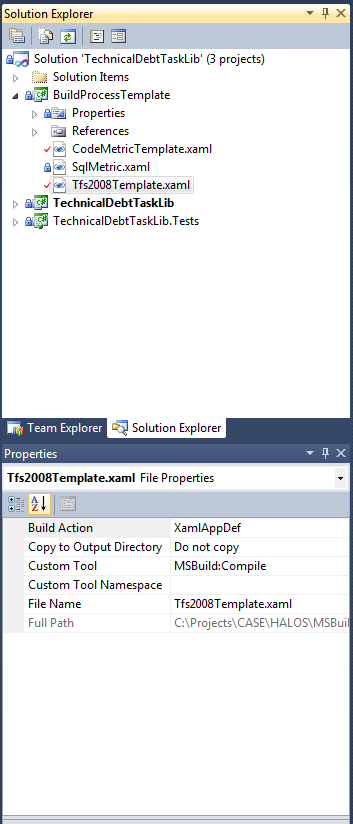
So, if you want to have a project where you work on TFS 2010 workflow build templates, and decide you want to conceptually branch a template into 2 parts based on an existing.  Copy, Paste, done?

Nope. If your project is set up as mine is with Build Action: XamlAppDef and Custom Tool MsBuild:Compile,
now there's a namespace/class conflict.


You get something like this


2 changes are needed. Right click the template and view code.
The first line that looks like


Which are the two points that need to be renamed. a sample rename would be:


Now your template compiles.

Monday, May 2, 2011

An ActivityDesigner for InvokeAction

Building off of An ActivityDesigner for InvokeAction

The only changes needed to make it work for InvokeAction was in the Xaml

< WrapPanel name="ArgumentWrapPanel">
and the OnModelItemChanged override:

 //set ETB expression type
            var generics = invokeActionObj.GetType().GetGenericArguments();
            if (generics.Length > 0)
            {
                this.ArgumentETB.ExpressionType = generics[0];
            }
            else
            {
                this.ArgumentETB.IsEnabled = false;
                this.ArgumentETB.Expression = null;
                this.ArgumentWrapPanel.Visibility = System.Windows.Visibility.Collapsed;

            }